分析:评估与结果分析
介绍
Analysis 旨在展示 日内交易 的图形报告,帮助用户直观地评估和分析投资组合。以下是一些可查看的图形:
- 分析位置
报告图
得分 IC 图
累计收益图
风险分析图
排名标签图
- 分析模型
模型性能图
Qlib中所有累积利润指标(例如收益、最大回撤)通过求和计算。这避免了指标或图表随着时间的推移而呈指数偏斜。
图形报告
用户可以运行以下代码以获取所有支持的报告。
>> import qlib.contrib.report as qcr
>> print(qcr.GRAPH_NAME_LIST)
['analysis_position.report_graph', 'analysis_position.score_ic_graph', 'analysis_position.cumulative_return_graph', 'analysis_position.risk_analysis_graph', 'analysis_position.rank_label_graph', 'analysis_model.model_performance_graph']
备注
有关更多详细信息,请参阅函数文档:类似于 help(qcr.analysis_position.report_graph)
用法与示例
analysis_position.report 的用法
API
- qlib.contrib.report.analysis_position.report.report_graph(report_df: DataFrame, show_notebook: bool = True) [<class 'list'>, <class 'tuple'>]
显示回测报告
示例:
import qlib
import pandas as pd
from qlib.utils.time import Freq
from qlib.utils import flatten_dict
from qlib.backtest import backtest, executor
from qlib.contrib.evaluate import risk_analysis
from qlib.contrib.strategy import TopkDropoutStrategy

# init qlib
qlib.init(provider_uri=<qlib data dir>)

CSI300_BENCH = "SH000300"
FREQ = "day"
STRATEGY_CONFIG = {
    "topk": 50,
    "n_drop": 5,
    # pred_score, pd.Series
    "signal": pred_score,
}

EXECUTOR_CONFIG = {
    "time_per_step": "day",
    "generate_portfolio_metrics": True,
}

backtest_config = {
    "start_time": "2017-01-01",
    "end_time": "2020-08-01",
    "account": 100000000,
    "benchmark": CSI300_BENCH,
    "exchange_kwargs": {
        "freq": FREQ,
        "limit_threshold": 0.095,
        "deal_price": "close",
        "open_cost": 0.0005,
        "close_cost": 0.0015,
        "min_cost": 5,
    },
}

# strategy object
strategy_obj = TopkDropoutStrategy(**STRATEGY_CONFIG)
# executor object
executor_obj = executor.SimulatorExecutor(**EXECUTOR_CONFIG)
# backtest
portfolio_metric_dict, indicator_dict = backtest(executor=executor_obj, strategy=strategy_obj, **backtest_config)
analysis_freq = "{0}{1}".format(*Freq.parse(FREQ))
# backtest info
report_normal_df, positions_normal = portfolio_metric_dict.get(analysis_freq)

qcr.analysis_position.report_graph(report_normal_df)
- 参数:
report_df -- df.index.name 必须是 date,df.columns 必须包含 return,turnover,cost,bench。 .. code-block:: python return cost bench turnover date 2017-01-04 0.003421 0.000864 0.011693 0.576325 2017-01-05 0.000508 0.000447 0.000721 0.227882 2017-01-06 -0.003321 0.000212 -0.004322 0.102765 2017-01-09 0.006753 0.000212 0.006874 0.105864 2017-01-10 -0.000416 0.000440 -0.003350 0.208396
show_notebook -- 是否在笔记本中显示图形,默认值为 True。
- 返回:
如果 show_notebook 为 True,则在笔记本中显示;否则返回 plotly.graph_objs.Figure 列表。
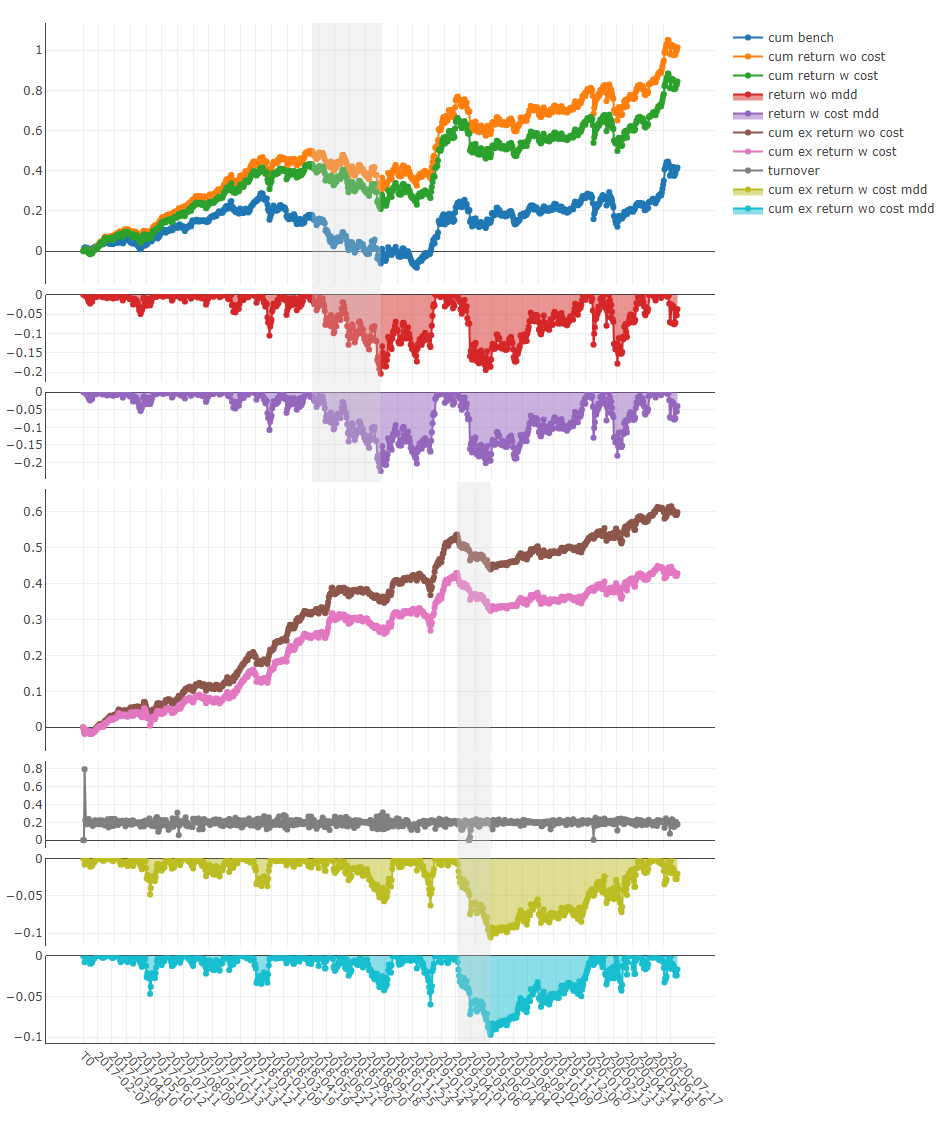
图形结果
备注
X轴:交易日
- Y轴:
- cum bench
基准的累积收益系列
- cum return wo cost
不含成本的投资组合累积收益系列
- cum return w cost
含成本的投资组合累积收益系列
- return wo mdd
不含成本的累积收益的最大回撤系列
- return w cost mdd:
包含成本的累计收益的最大回撤系列
- cum ex return wo cost
与基准相比的投资组合的`CAR`(累计异常收益)系列,不包含成本。
- cum ex return w cost
与基准相比的投资组合的`CAR`(累计异常收益)系列,包含成本。
- turnover
换手率系列
- cum ex return wo cost mdd
不包含成本的`CAR`(累计异常收益)回撤系列
- cum ex return w cost mdd
包含成本的`CAR`(累计异常收益)回撤系列
上方阴影部分:对应于`cum return wo cost`的最大回撤
下方阴影部分:对应于`cum ex return wo cost`的最大回撤
`analysis_position.score_ic`的使用
API
- qlib.contrib.report.analysis_position.score_ic.score_ic_graph(pred_label: DataFrame, show_notebook: bool = True, **kwargs) [<class 'list'>, <class 'tuple'>]
得分 IC
示例:
from qlib.data import D
from qlib.contrib.report import analysis_position
pred_df_dates = pred_df.index.get_level_values(level='datetime')
features_df = D.features(D.instruments('csi500'), ['Ref($close, -2)/Ref($close, -1)-1'], pred_df_dates.min(), pred_df_dates.max())
features_df.columns = ['label']
pred_label = pd.concat([features_df, pred], axis=1, sort=True).reindex(features_df.index)
analysis_position.score_ic_graph(pred_label)
- 参数:
pred_label -- 索引是 pd.MultiIndex,索引名称是 [instrument, datetime];列名称是 [score, label]。 .. code-block:: python instrument datetime score label SH600004 2017-12-11 -0.013502 -0.013502 2017-12-12 -0.072367 -0.072367 2017-12-13 -0.068605 -0.068605 2017-12-14 0.012440 0.012440 2017-12-15 -0.102778 -0.102778
show_notebook -- 是否在笔记本中显示图形,默认值为 True。
- 返回:
如果 show_notebook 为 True,则在笔记本中显示;否则返回 plotly.graph_objs.Figure 列表。
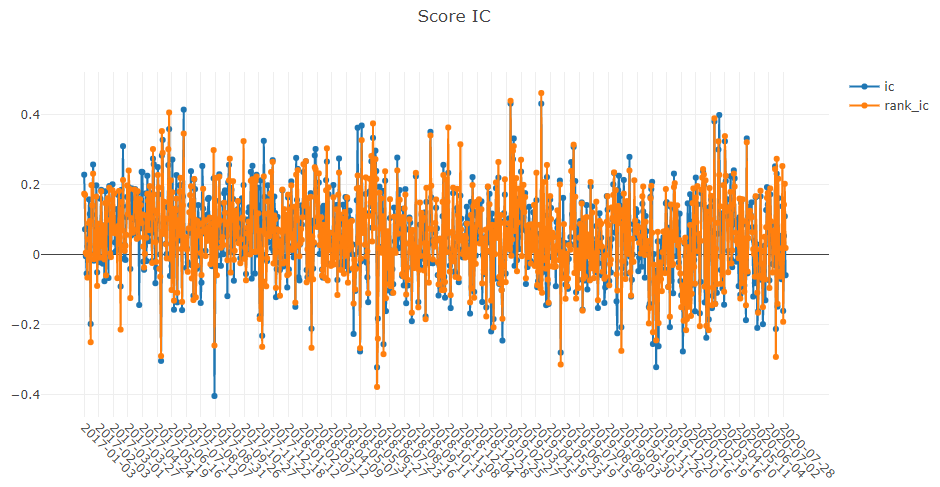
图形结果
备注
X轴:交易日
- Y轴:
- ic
标签与预测得分之间的`Pearson相关系数`系列。在上述示例中,label`被定义为`Ref($close, -2)/Ref($close, -1)-1。有关更多详细信息,请参阅`数据特征 <data.html#feature>`_。
- rank_ic
标签与预测得分之间的`Spearman等级相关系数`系列。
`analysis_position.risk_analysis`的使用
API
- qlib.contrib.report.analysis_position.risk_analysis.risk_analysis_graph(analysis_df: DataFrame | None = None, report_normal_df: DataFrame | None = None, report_long_short_df: DataFrame | None = None, show_notebook: bool = True) Iterable[Figure]
生成分析图和月度分析
示例:
import qlib
import pandas as pd
from qlib.utils.time import Freq
from qlib.utils import flatten_dict
from qlib.backtest import backtest, executor
from qlib.contrib.evaluate import risk_analysis
from qlib.contrib.strategy import TopkDropoutStrategy

# init qlib
qlib.init(provider_uri=<qlib data dir>)

CSI300_BENCH = "SH000300"
FREQ = "day"
STRATEGY_CONFIG = {
    "topk": 50,
    "n_drop": 5,
    # pred_score, pd.Series
    "signal": pred_score,
}

EXECUTOR_CONFIG = {
    "time_per_step": "day",
    "generate_portfolio_metrics": True,
}

backtest_config = {
    "start_time": "2017-01-01",
    "end_time": "2020-08-01",
    "account": 100000000,
    "benchmark": CSI300_BENCH,
    "exchange_kwargs": {
        "freq": FREQ,
        "limit_threshold": 0.095,
        "deal_price": "close",
        "open_cost": 0.0005,
        "close_cost": 0.0015,
        "min_cost": 5,
    },
}

# strategy object
strategy_obj = TopkDropoutStrategy(**STRATEGY_CONFIG)
# executor object
executor_obj = executor.SimulatorExecutor(**EXECUTOR_CONFIG)
# backtest
portfolio_metric_dict, indicator_dict = backtest(executor=executor_obj, strategy=strategy_obj, **backtest_config)
analysis_freq = "{0}{1}".format(*Freq.parse(FREQ))
# backtest info
report_normal_df, positions_normal = portfolio_metric_dict.get(analysis_freq)
analysis = dict()
analysis["excess_return_without_cost"] = risk_analysis(
    report_normal_df["return"] - report_normal_df["bench"], freq=analysis_freq
)
analysis["excess_return_with_cost"] = risk_analysis(
    report_normal_df["return"] - report_normal_df["bench"] - report_normal_df["cost"], freq=analysis_freq
)

analysis_df = pd.concat(analysis)  # type: pd.DataFrame
analysis_position.risk_analysis_graph(analysis_df, report_normal_df)
- 参数:
analysis_df -- 分析数据,索引为 pd.MultiIndex;列名为 [risk]。 .. 代码块:: python risk excess_return_without_cost mean 0.000692 std 0.005374 annualized_return 0.174495 information_ratio 2.045576 max_drawdown -0.079103 excess_return_with_cost mean 0.000499 std 0.005372 annualized_return 0.125625 information_ratio 1.473152 max_drawdown -0.088263
report_normal_df -- df.index.name 必须为 date,df.columns 必须包含 return,turnover,cost,bench。 .. 代码块:: python return cost bench turnover date 2017-01-04 0.003421 0.000864 0.011693 0.576325 2017-01-05 0.000508 0.000447 0.000721 0.227882 2017-01-06 -0.003321 0.000212 -0.004322 0.102765 2017-01-09 0.006753 0.000212 0.006874 0.105864 2017-01-10 -0.000416 0.000440 -0.003350 0.208396
report_long_short_df -- df.index.name 必须为 date,df.columns 包含 long,short,long_short。 .. 代码块:: python long short long_short date 2017-01-04 -0.001360 0.001394 0.000034 2017-01-05 0.002456 0.000058 0.002514 2017-01-06 0.000120 0.002739 0.002859 2017-01-09 0.001436 0.001838 0.003273 2017-01-10 0.000824 -0.001944 -0.001120
show_notebook -- 是否在笔记本中显示图形,默认 True。如果为 True,则在笔记本中显示图形;如果为 False,则返回图形。
- 返回:
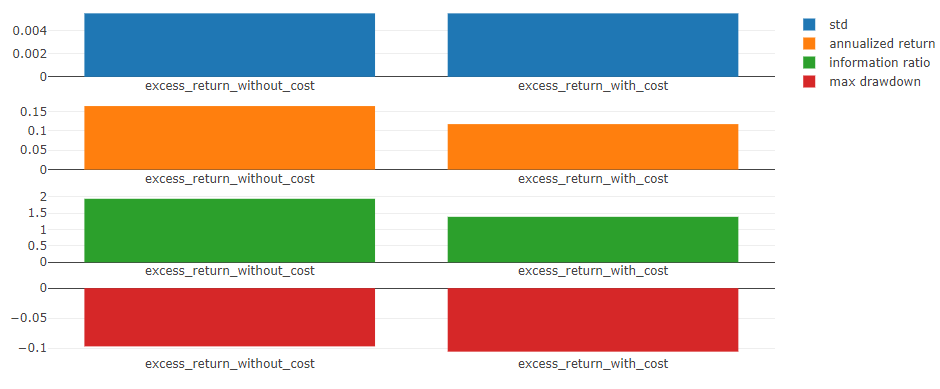
图形结果
备注
- 一般图形
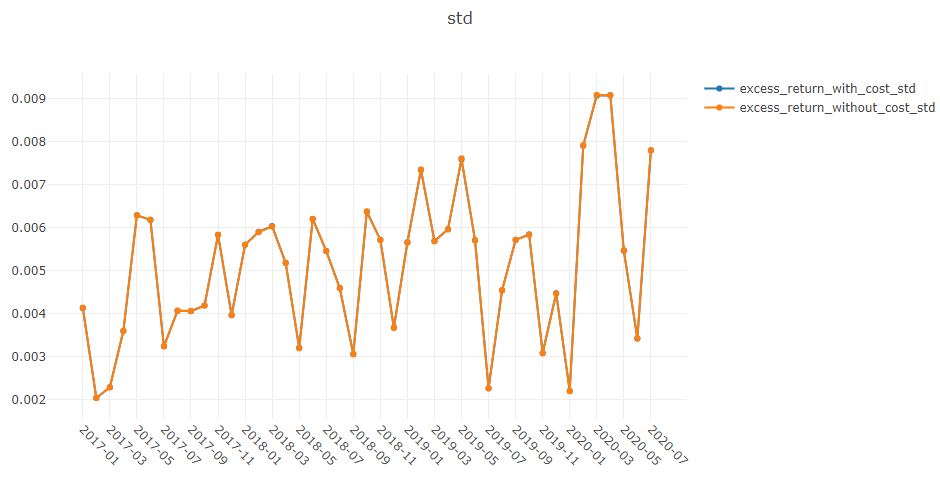
- 标准
- 不含成本的超额收益
不含成本的 CAR`(累积异常收益)的 `标准差。
- 含成本的超额收益
含成本的 CAR`(累积异常收益)的 `标准差。
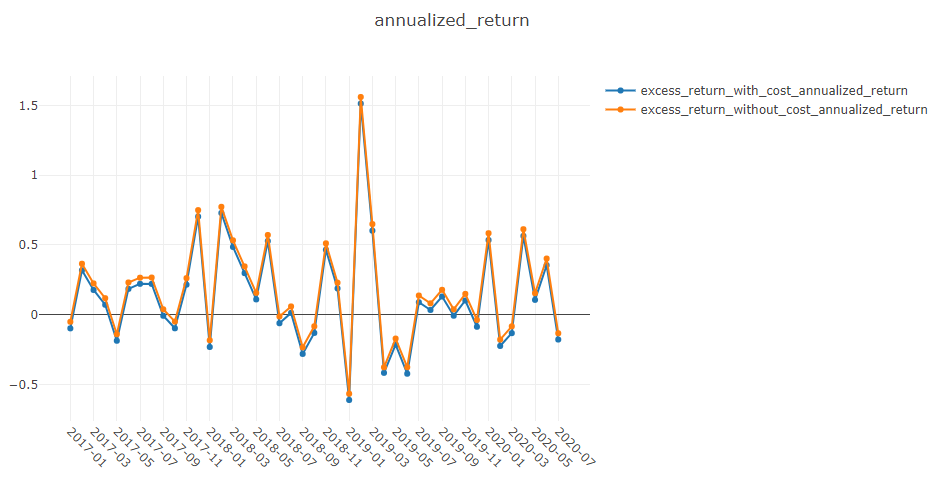
- 年化收益
- 不含成本的超额收益
不含成本的 CAR`(累积异常收益)的 `年化率。
- 含成本的超额收益
含成本的 CAR`(累积异常收益)的 `年化率。
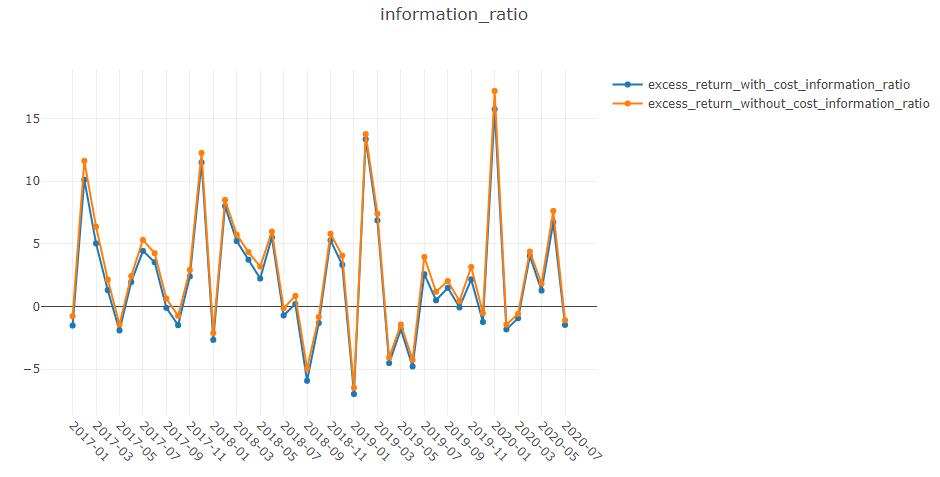
- 信息比率
- 不含成本的超额收益
不含成本的 信息比率。
- 含成本的超额收益
含成本的 信息比率。
要了解更多关于 信息比率 的信息,请参考 信息比率 – IR。
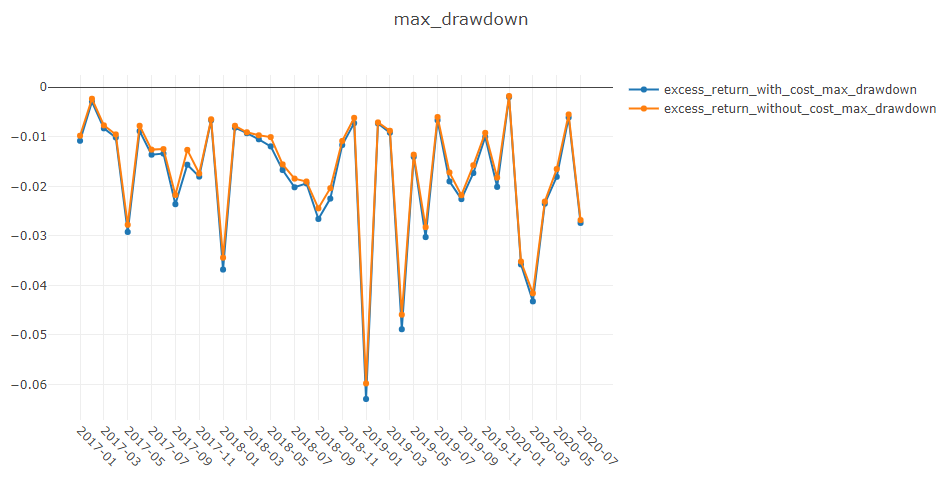
- 最大回撤
- 不含成本的超额收益
不含成本的 CAR`(累积异常收益)的 `最大回撤。
- 含成本的超额收益
含成本的 CAR`(累积异常收益)的 `最大回撤。
备注
- 年化收益/最大回撤/信息比率/标准图形
X轴:按月分组的交易日
- Y轴:
- 年化收益图形
- 不含成本的超额收益年化收益
无成本的每月 CAR`(累积异常收益)的 `年化收益率 系列。
- excess_return_with_cost_annualized_return
有成本的每月 CAR`(累积异常收益)的 `年化收益率 系列。
- 最大回撤图形
- excess_return_without_cost_max_drawdown
无成本的每月 CAR`(累积异常收益)的 `最大回撤 系列。
- excess_return_with_cost_max_drawdown
有成本的每月 CAR`(累积异常收益)的 `最大回撤 系列。
- 信息比率图形
- excess_return_without_cost_information_ratio
无成本的每月 CAR`(累积异常收益)的 `信息比率 系列。
- excess_return_with_cost_information_ratio
有成本的每月 CAR`(累积异常收益)的 `信息比率 系列。
- 标准差图形
- excess_return_without_cost_max_drawdown
无成本的每月 CAR`(累积异常收益)的 `标准差 系列。
- excess_return_with_cost_max_drawdown
有成本的每月 CAR`(累积异常收益)的 `标准差 系列。
analysis_model.analysis_model_performance 的使用
API
- qlib.contrib.report.analysis_model.analysis_model_performance.ic_figure(ic_df: DataFrame, show_nature_day=True, **kwargs) Figure
IC 图
- 参数:
ic_df -- ic 数据框
show_nature_day -- 是否显示非交易日的横坐标
**kwargs -- 包含一些参数以控制 plotly 中的绘图样式。目前支持 - rangebreaks: https://plotly.com/python/time-series/#Hiding-Weekends-and-Holidays
- 返回:
plotly.graph_objs.Figure
- qlib.contrib.report.analysis_model.analysis_model_performance.model_performance_graph(pred_label: DataFrame, lag: int = 1, N: int = 5, reverse=False, rank=False, graph_names: list = ['group_return', 'pred_ic', 'pred_autocorr'], show_notebook: bool = True, show_nature_day: bool = False, **kwargs) [<class 'list'>, <class 'tuple'>]
模型性能
- 参数:
pred_label -- 索引是 pd.MultiIndex,索引名称是 [instrument, datetime];列名称是 [score, label]。它通常与模型训练的标签相同(例如:"Ref($close, -2)/Ref($close, -1) - 1")。 .. code-block:: python instrument datetime score label SH600004 2017-12-11 -0.013502 -0.013502 2017-12-12 -0.072367 -0.072367 2017-12-13 -0.068605 -0.068605 2017-12-14 0.012440 0.012440 2017-12-15 -0.102778 -0.102778
lag -- pred.groupby(level='instrument')['score'].shift(lag)。它将仅用于自相关计算。
N -- 组数,默认值为 5。
reverse -- 如果 True,则 pred['score'] *= -1。
rank -- 如果 True,计算排名 ic。
graph_names -- 图形名称;默认值 ['cumulative_return', 'pred_ic', 'pred_autocorr', 'pred_turnover']。
show_notebook -- 是否在笔记本中显示图形,默认值为 True。
show_nature_day -- 是否显示非交易日的横坐标。
**kwargs -- 包含一些参数以控制 plotly 中的绘图样式。目前支持 - rangebreaks: https://plotly.com/python/time-series/#Hiding-Weekends-and-Holidays
- 返回:
如果 show_notebook 为 True,则在笔记本中显示;否则返回 plotly.graph_objs.Figure 列表。
图形结果
备注
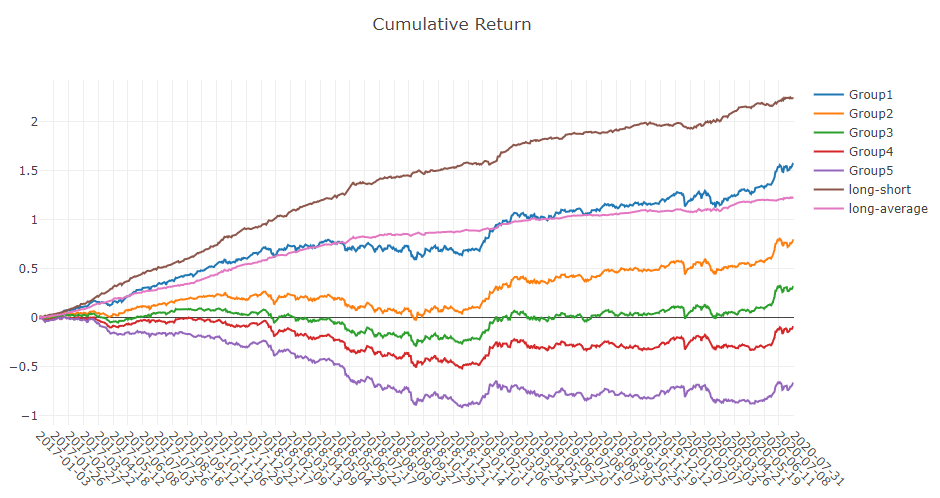
- 累积收益图形
- Group1:
标签排名比例 <= 20% 的股票组的 累计收益 系列
- 组2:
标签排名比例在 20% < 标签排名比例 <= 40% 的股票组的 累计收益 系列
- 组3:
标签排名比例在 40% < 标签排名比例 <= 60% 的股票组的 累计收益 系列
- 组4:
标签排名比例在 60% < 标签排名比例 <= 80% 的股票组的 累计收益 系列
- 组5:
标签排名比例在 80% < 标签排名比例 的股票组的 累计收益 系列
- 多空:
组1 和 组5 的 累计收益 之间的差异系列
- 多平均
组1 的 累计收益 和所有股票的平均 累计收益 之间的差异系列。
- 标签排名比例可以如下公式表示。
- \[排名\ 比例 = \frac{标签的升序排名}{投资组合中的股票数量}\]
备注
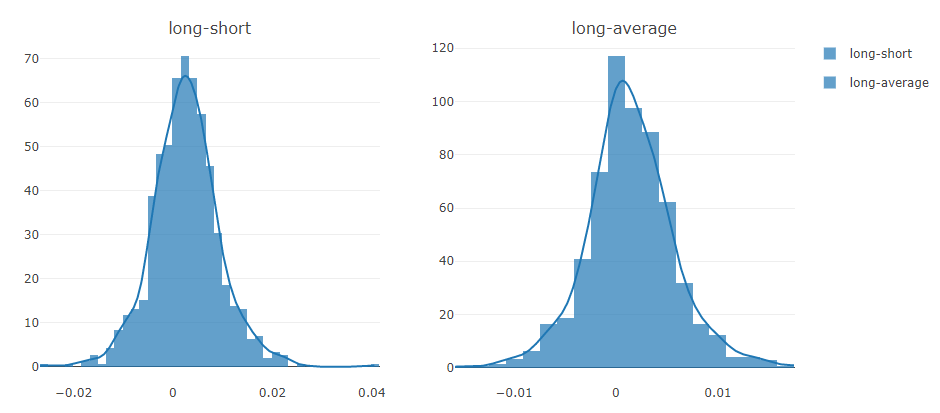
- 多空/多平均
每个交易日的多空/多平均收益的分布
备注
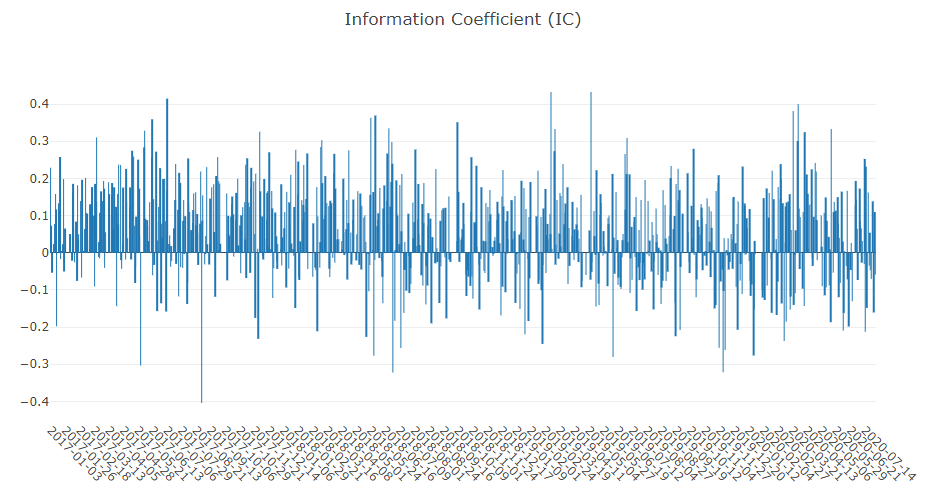
- 信息系数
投资组合中股票的 标签 和 预测分数 之间的 皮尔逊相关系数 系列。
图形报告可用于评估 预测分数。
备注
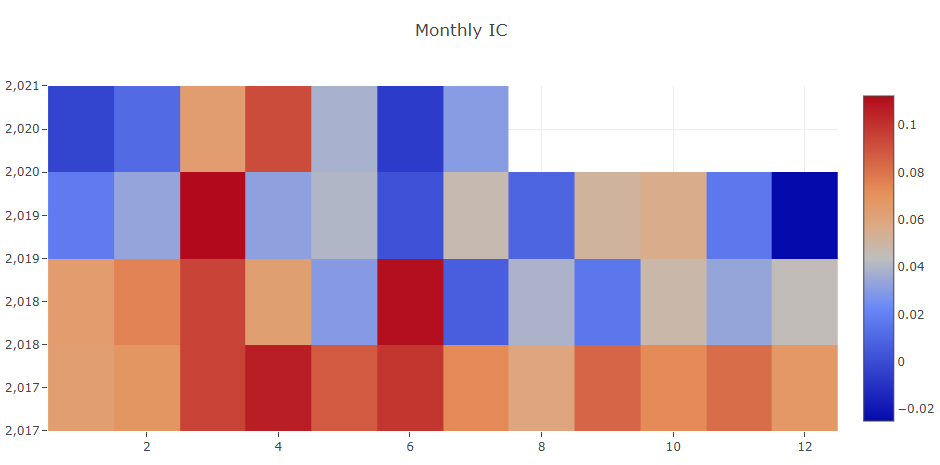
- 每月 IC
每月 信息系数 的平均值
备注
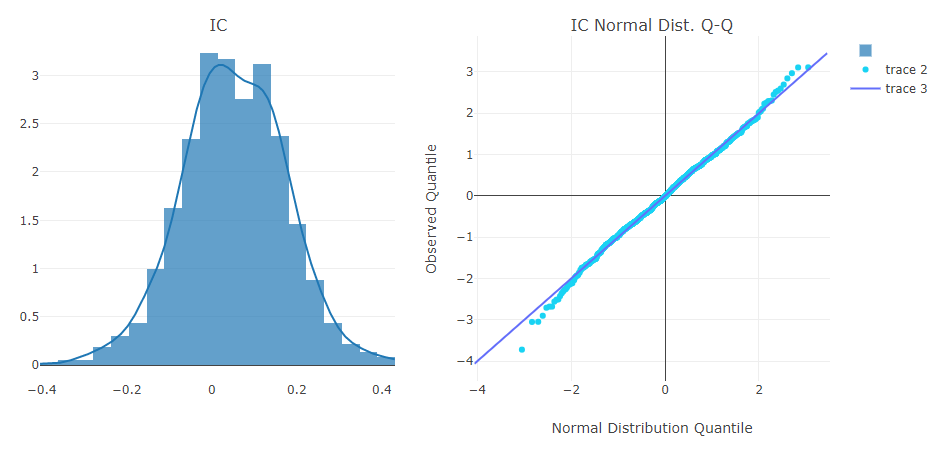
- IC
每个交易日的 信息系数 分布。
- IC 正态分布 Q-Q
分位数-分位数图 用于每个交易日的 信息系数 的正态分布。
备注
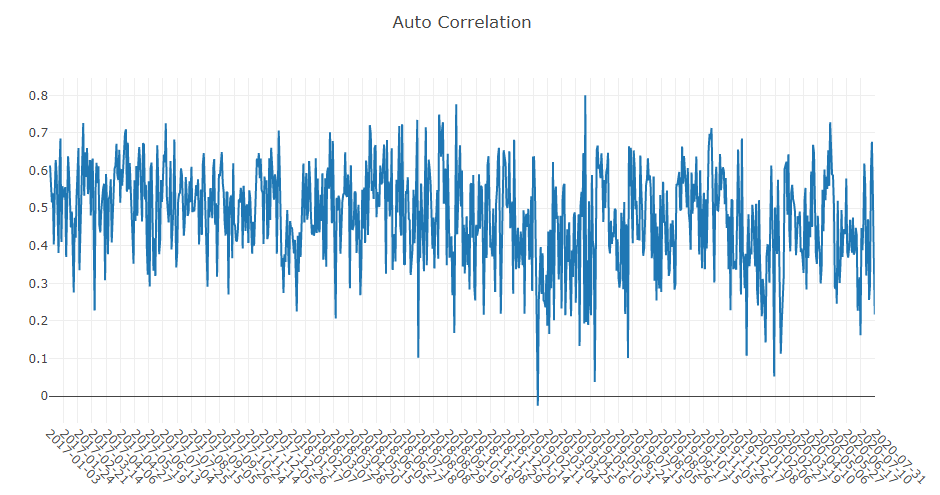
- 自相关
每个交易日投资组合中股票最新的 预测分数 与 滞后 天前的 预测分数 之间的 皮尔逊相关系数 序列。
图形报告可用于估计换手率。