fmean module
Module with FMEAN.
FMEAN class
FMEAN(
    wrapper,
    input_list,
    input_mapper,
    in_output_list,
    output_list,
    param_list,
    mapper_list,
    short_name,
    **kwargs
)
Look-ahead indicator based on future_mean_nb.
Superclasses
- Analyzable
- AttrResolverMixin
- Base
- Cacheable
- Chainable
- Comparable
- Configured
- ExtPandasIndexer
- HasSettings
- HasWrapper
- IndexApplier
- IndexingBase
- IndicatorBase
- ItemParamable
- Itemable
- PandasIndexer
- Paramable
- Pickleable
- PlotsBuilderMixin
- Prettified
- StatsBuilderMixin
- Wrapping
vectorbtpro.labels.generators.fmean.ParamIndexer
Inherited members
- AttrResolverMixin.deep_getattr
- AttrResolverMixin.post_resolve_attr
- AttrResolverMixin.pre_resolve_attr
- AttrResolverMixin.resolve_attr
- AttrResolverMixin.resolve_shortcut_attr
- Base.chat
- Base.find_api
- Base.find_assets
- Base.find_docs
- Base.find_examples
- Base.find_messages
- Cacheable.get_ca_setup
- Chainable.chain
- Chainable.pipe
- Configured.copy
- Configured.equals
- Configured.get_writeable_attrs
- Configured.prettify
- Configured.replace
- Configured.resolve_merge_kwargs
- Configured.update_config
- HasSettings.get_path_setting
- HasSettings.get_path_settings
- HasSettings.get_setting
- HasSettings.get_settings
- HasSettings.has_path_setting
- HasSettings.has_path_settings
- HasSettings.has_setting
- HasSettings.has_settings
- HasSettings.reset_settings
- HasSettings.resolve_setting
- HasSettings.resolve_settings_paths
- HasSettings.set_settings
- HasWrapper.chunk
- HasWrapper.chunk_apply
- HasWrapper.get_item_keys
- HasWrapper.select_col
- HasWrapper.select_col_from_obj
- HasWrapper.should_wrap
- HasWrapper.split
- HasWrapper.split_apply
- HasWrapper.ungroup
- IndexApplier.add_levels
- IndexApplier.drop_duplicate_levels
- IndexApplier.drop_levels
- IndexApplier.drop_redundant_levels
- IndexApplier.select_levels
- IndexingBase.indexing_setter_func
- IndicatorBase.cls_dir
- IndicatorBase.column_only_select
- IndicatorBase.column_stack
- IndicatorBase.config
- IndicatorBase.dropna
- IndicatorBase.fix_docstrings
- IndicatorBase.get
- IndicatorBase.group_select
- IndicatorBase.iloc
- IndicatorBase.in_output_names
- IndicatorBase.indexing_func
- IndicatorBase.indexing_kwargs
- IndicatorBase.input_names
- IndicatorBase.items
- IndicatorBase.lazy_output_names
- IndicatorBase.level_names
- IndicatorBase.loc
- IndicatorBase.main_output
- IndicatorBase.output_flags
- IndicatorBase.output_names
- IndicatorBase.param_defaults
- IndicatorBase.param_names
- IndicatorBase.plots_defaults
- IndicatorBase.range_only_select
- IndicatorBase.rec_state
- IndicatorBase.rename
- IndicatorBase.rename_levels
- IndicatorBase.row_stack
- IndicatorBase.run_pipeline
- IndicatorBase.self_aliases
- IndicatorBase.short_name
- IndicatorBase.stats_defaults
- IndicatorBase.to_dict
- IndicatorBase.to_frame
- IndicatorBase.unpack
- IndicatorBase.unwrapped
- IndicatorBase.wrapper
- IndicatorBase.xloc
- ItemParamable.as_param
- PandasIndexer.xs
- Pickleable.decode_config
- Pickleable.decode_config_node
- Pickleable.dumps
- Pickleable.encode_config
- Pickleable.encode_config_node
- Pickleable.file_exists
- Pickleable.getsize
- Pickleable.load
- Pickleable.loads
- Pickleable.modify_state
- Pickleable.resolve_file_path
- Pickleable.save
- PlotsBuilderMixin.build_subplots_doc
- PlotsBuilderMixin.override_subplots_doc
- PlotsBuilderMixin.plots
- PlotsBuilderMixin.resolve_plots_setting
- Prettified.pprint
- StatsBuilderMixin.build_metrics_doc
- StatsBuilderMixin.override_metrics_doc
- StatsBuilderMixin.resolve_stats_setting
- StatsBuilderMixin.stats
- Wrapping.apply_to_index
- Wrapping.regroup
- Wrapping.resample
- Wrapping.resolve_column_stack_kwargs
- Wrapping.resolve_row_stack_kwargs
- Wrapping.resolve_self
- Wrapping.resolve_stack_kwargs
Subclasses
vectorbtpro.labels.generators.fmean._FMEAN
apply_func method
Apply function.
cache_func NoneType
Cache function.
close class property
Input array.
close_above method
Return True for each element where close is above other.
See combine_objs.
close_below method
Return True for each element where close is below other.
See combine_objs.
close_crossed_above method
Return True for each element where close is crossed_above other.
See combine_objs.
close_crossed_below method
Return True for each element where close is crossed_below other.
See combine_objs.
close_equal method
Return True for each element where close is equal other.
See combine_objs.
close_stats method
Stats of close as generic.
custom_func method
IndicatorFactory.with_apply_func.<locals>.custom_func(
    input_tuple,
    in_output_tuple,
    param_tuple,
    *_args,
    input_shape=None,
    per_column=False,
    split_columns=False,
    skipna=False,
    return_cache=False,
    use_cache=True,
    jitted_loop=False,
    jitted_warmup=False,
    param_index=None,
    final_index=None,
    single_comb=False,
    execute_kwargs=None,
    **_kwargs
)
Custom function.
fmean class property
Output array.
fmean_above method
Return True for each element where fmean is above other.
See combine_objs.
fmean_below method
Return True for each element where fmean is below other.
See combine_objs.
fmean_crossed_above method
Return True for each element where fmean is crossed_above other.
See combine_objs.
fmean_crossed_below method
Return True for each element where fmean is crossed_below other.
See combine_objs.
fmean_equal method
Return True for each element where fmean is equal other.
See combine_objs.
fmean_stats method
Stats of fmean as generic.
param_select_func_nb method
Parameter selection function.
plot method
_FMEAN.plot(
    column=None,
    plot_close=True,
    close_trace_kwargs=None,
    fmean_trace_kwargs=None,
    add_trace_kwargs=None,
    fig=None,
    **layout_kwargs
)
Plot FMEAN.fmean against FMEAN.close.
Args
column:str- Name of the column to plot.
plot_close:bool- Whether to plot FMEAN.close.
close_trace_kwargs:dict- Keyword arguments passed to
plotly.graph_objects.Scatterfor FMEAN.close. fmean_trace_kwargs:dict- Keyword arguments passed to
plotly.graph_objects.Scatterfor FMEAN.fmean. add_trace_kwargs:dict- Keyword arguments passed to
fig.add_tracewhen adding each trace. fig:FigureorFigureWidget- Figure to add traces to.
**layout_kwargs- Keyword arguments passed to
fig.update_layout.
Usage

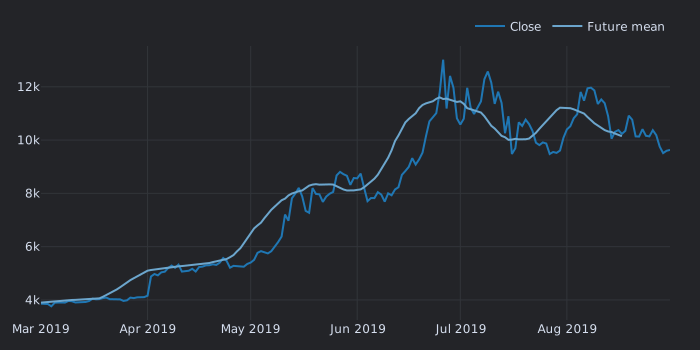
run class method
FMEAN.run(
    close,
    window=Default(value=14),
    wtype=Default(value='simple'),
    wait=Default(value=1),
    short_name='fmean',
    hide_params=None,
    hide_default=True,
    **kwargs
)
Run FMEAN indicator.
- Inputs:
close - Parameters:
window,wtype,wait - Outputs:
fmean
Pass a list of parameter names as hide_params to hide their column levels, or True to hide all. Set hide_default to False to show the column levels of the parameters with a default value.
Other keyword arguments are passed to IndicatorBase.run_pipeline.
run_combs class method
FMEAN.run_combs(
    close,
    window=Default(value=14),
    wtype=Default(value='simple'),
    wait=Default(value=1),
    r=2,
    param_product=False,
    comb_func=itertools.combinations,
    run_unique=True,
    short_names=None,
    hide_params=None,
    hide_default=True,
    **kwargs
)
Create a combination of multiple FMEAN indicators using function comb_func.
- Inputs:
close - Parameters:
window,wtype,wait - Outputs:
fmean
comb_func must accept an iterable of parameter tuples and r. Also accepts all combinatoric iterators from itertools such as itertools.combinations. Pass r to specify how many indicators to run. Pass short_names to specify the short name for each indicator. Set run_unique to True to first compute raw outputs for all parameters, and then use them to build each indicator (faster).
Other keyword arguments are passed to FMEAN.run.
Note
This method should only be used when multiple indicators are needed. To test multiple parameters, pass them as lists to FMEAN.run.
wait_list class property
List of wait values.
window_list class property
List of window values.
wtype_list class property
List of wtype values.